
Ransomware Protection Guide: Complete Security Strategy

Ransomware protection is critical for Australian organisations. Attacks hit councils, healthcare, schools and businesses, causing weeks of downtime and data loss.
If you rely on digital systems, you need a clear ransomware prevention and recovery plan before attackers strike. This guide shows you how attacks work, the local threat, and specific steps to protect your business.
What is ransomware?
Ransomware is a type of malware that stops you from accessing your data or systems until you pay a ransom. In most cases, the attacker encrypts your files so you can’t open them. In some cases, they also steal data and threaten to leak it if you do not pay.
Common types of ransomware include:
- Encrypting ransomware – encrypts files and demands payment for a decryption key.
- Locker ransomware – locks you out of devices or applications completely.
- Double extortion ransomware – both encrypts and steals data, then threatens to publish it.
Attackers run automated mass campaigns scanning the internet and sending phishing emails at scale. Any business with exposed services, weak access controls or poor backups gets hit.
Common entry points include phishing emails, exposed RDP, unpatched software, stolen passwords, and malicious downloads that silently install ransomware.
How ransomware attacks work
Most ransomware attacks follow a similar lifecycle, and understanding this chain helps you break an attack at multiple points. An attacker gets in through phishing, exposed remote access or a vulnerable system, then quietly spreads and escalates their access.
They often steal sensitive data before they launch the attack. Next, the ransomware encrypts files across servers, databases and sometimes backups, stopping your operations. Finally, the attacker demands a ransom payment in cryptocurrency in exchange for a decryption key and a promise not to leak the stolen data.
Essential ransomware prevention strategies
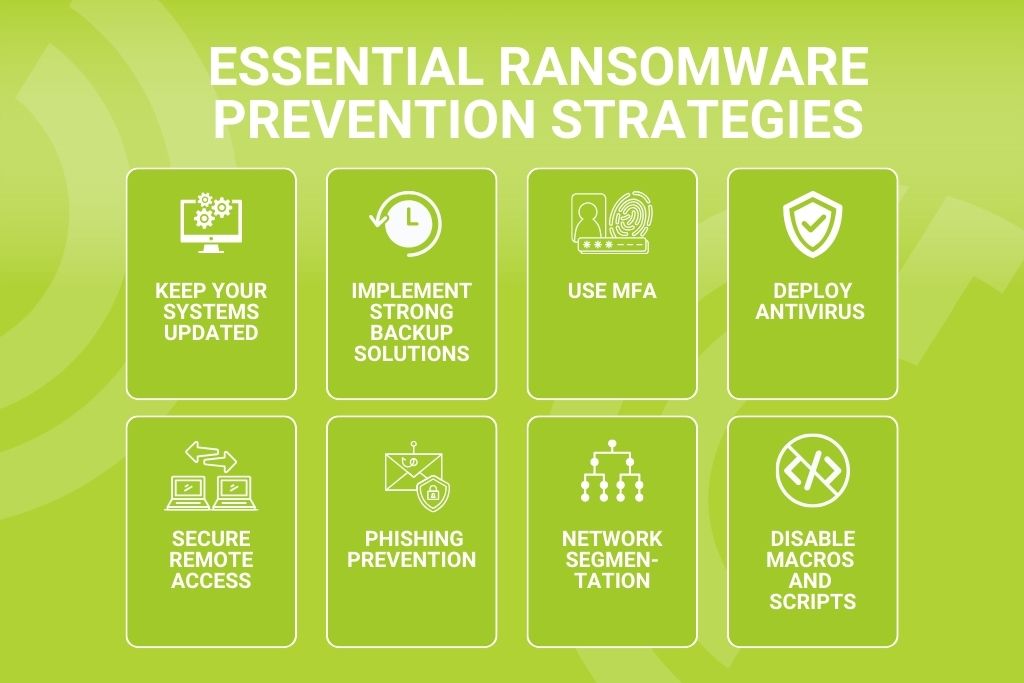
Keep your systems updated
Unpatched systems are one of the easiest ways for ransomware to get in. Many high‑profile ransomware attacks have used known vulnerabilities that had patches available for months.
Enable automatic updates for operating systems, browsers and applications. Use central patch management to track status across all devices and prioritise security patches for internet-facing systems.
Implement strong backup solutions
Backups are the last line of defence when ransomware protection fails. Follow the 3-2-1 backup rule: three copies of data, on two different media types, with one offline or isolated.
Australian cloud backup options provide offsite protection while addressing data sovereignty. Regularly test backups and use separate accounts to protect backup infrastructure from compromised credentials.
Use Multi‑Factor Authentication (MFA)
Stolen passwords are a common attack path. MFA greatly reduces this risk, even if credentials are compromised.
Enforce MFA for admin access, remote gateways, cloud portals and email first. Modern methods like app-based prompts or hardware keys work better than SMS and align with Australian privacy requirements.
Deploy antivirus and anti‑ransomware software
Modern endpoint protection combines signatures with behaviour monitoring to detect ransomware. Look for behaviour-based blocking and central visibility for quick response.
Free tools work for home users, but businesses with sensitive data need paid enterprise solutions. Choose Australian-friendly vendors with local support for better incident response.
Secure remote access
Remote access is a major ransomware vector. Never expose raw RDP to the internet, use a VPN with MFA instead. Harden VPNs with current firmware and disable weak protocols.
Zero-trust network access limits users to specific apps rather than full network access, reducing lateral movement risks.
Email security and phishing prevention
Most ransomware starts with email. Implement filtering gateways to block malicious domains and attachments before they reach inboxes. Use safe attachment handling and URL rewriting for extra protection.
Train staff with short, regular sessions using Australian example scams. Make reporting suspicious emails easy to enable quick action.
Network segmentation
Flat networks let ransomware spread easily. Segment critical servers like domain controllers and ERP systems from user networks. Use firewalls and access controls to restrict lateral movement between segments.
Treat backup infrastructure as a separate, protected zone, ransomware often targets backups first to prevent recovery.
Disable macros and scripts
Many attacks use malicious macros and scripts. Disable Office macros by default for internet documents and only allow signed macros from trusted sources.
Limit PowerShell to admins and enable logging to catch unusual activity. Move business processes to safer automation tools where possible to reduce your attack surface.
Advanced protection measures
Endpoint Detection and Response (EDR)
EDR continuously monitors endpoint activity and flags suspicious behaviour seen in ransomware attacks. It detects unknown threats that traditional antivirus misses and provides detailed telemetry for forensic investigation.
Integration with DLM IT’s managed detection and response services enables 24/7 monitoring. For medium and larger organisations, EDR is now a core component of robust ransomware protection.
Security awareness training
Technology alone cannot stop all ransomware attacks, people need to know what to look for. Run short, regular training sessions using Australian-specific examples that feel real to your staff.
Include phishing simulations to safely test and improve awareness. A no‑blame culture encourages early reporting, which often limits damage and helps staff understand how to avoid ransomware daily.
Incident response planning
Ransomware is an “assume breach” risk, so planning your response reduces confusion and downtime. Define clear roles for who leads the response, communicates with stakeholders and engages external experts.
Create technical playbooks for isolation, backup restoration and communication when email is down. Test your plan through tabletop exercises to expose gaps before a real attacker does.
What to do if you’re attacked
Immediate response steps
If you suspect ransomware, immediately isolate affected systems by disconnecting from the network. Screenshot ransom notes, preserve logs and notify executives, then contact the Australian Cyber Security Centre (ACSC). Don’t delete suspicious files. Early containment prevents small issues from becoming business-wide shutdowns.
Should you pay the ransom?
The ACSC strongly advises against paying, it doesn’t guarantee decryption or data deletion and funds further attacks. Many victims pay without full recovery. Legal risks exist if payments go to sanctioned groups. Strong backups make payment unnecessary.
Recovery process
Assess damage scope, then restore from clean 3-2-1 backups starting with critical systems. Use trusted decryption tools for older ransomware if available. Engage incident response experts for complex cases. Conduct post-incident reviews to strengthen future ransomware protection.
Australian resources and support

ACSC resources
The Australian Cyber Security Centre (ACSC) is the central government body for cyber security guidance. They provide practical ransomware prevention advice, step‑by‑step incident response guidance and portals for reporting attacks.
Legal and compliance
Ransomware incidents trigger legal duties under Australian law. The Privacy Act 1988 applies if personal information is involved, and the Notifiable Data Breaches scheme may require notification if serious harm is likely.
Professional services
DLM IT offers managed security services with proactive monitoring, compliance checks and 24/7 support.
Our blueprint-build-secure-support approach delivers tailored ransomware protection for local businesses. Partnering locally ensures expertise aligned with Australian regulations and rapid incident response when attacks occur.
Frequently asked questions
What is the best ransomware protection?
No single tool stops all ransomware, use a layered approach with MFA, modern endpoint protection/EDR, email filtering, user training, network segmentation and 3-2-1 backups. This reduces both attack likelihood and business impact. Australian businesses should prioritise these best practices across all devices. Test your ransomware protection solutions regularly.
How can I protect against ransomware for free?
Enable automatic updates, MFA on key accounts, reputable free antivirus, disconnected external drive backups, and phishing awareness training. These zero-cost steps create solid protection against ransomware for home users and micro-businesses. Businesses with sensitive data need paid security software. Start here to stop ransomware attacks immediately.
Does antivirus protect against ransomware?
Basic antivirus blocks known ransomware but misses sophisticated attacks using social engineering or zero-days. Modern endpoint protection adds behaviour detection to stop encryption attempts and protect backup storage. Combine with MFA, patching and training for robust protection. Antivirus alone cannot secure your entire organisation against ransomware.
What is the 3-2-1 backup rule?
The 3-2-1 backup rule keeps three copies of your data on two different media types, with one copy offline or air-gapped from devices on the network. This approach ensures ransomware may infect connected systems but cannot reach your isolated backup storage solution. Regular testing verifies backup integrity and your ability to restore after an attack. Following these best practices provides effective ransomware recovery when cybercriminals demand a ransom payment for your encrypted files.